






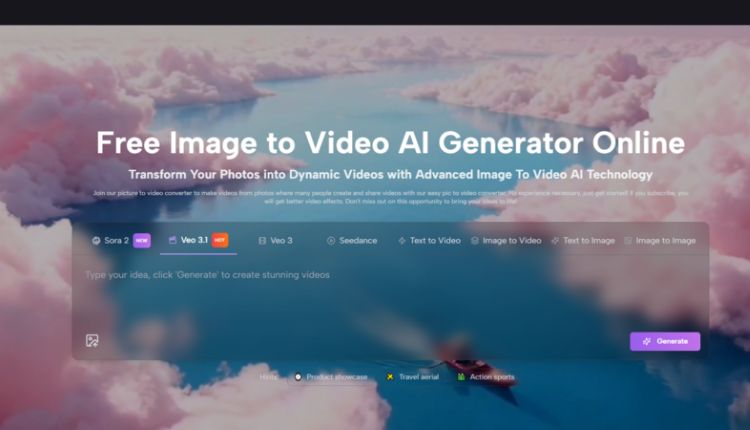
Image to Video AI is easy to dismiss if you have spent years around editing timelines, motion presets, and stock footage libraries. A still image has always felt like a starting point that needed a second tool, a second workflow, and usually a second specialist. That gap is where many ideas slow down. A campaign concept, a product mockup, a personal photo series, or a rough storyboard may already communicate the right visual direction, yet turning that direction into motion often demands more labor than the original idea itself. What caught my attention here is not that the platform promises motion from stills, but that it reframes the delay between visual intent and visual output.
The more I look at this category, the less useful it feels to judge it like a traditional editor. In my view, the real question is not whether it replaces professional post-production in every case. It does not. The more useful question is whether it helps people move from a good static asset to a usable moving asset without rebuilding the idea from scratch. On that front, this platform appears designed around access and speed. The official flow is simple, the interface foregrounds prompt-driven control, and the system is structured to help a user go from image plus direction to a downloadable video result in a compact loop.
Why Still Images Often Stall Good Ideas
A still image can be finished and unfinished at the same time. It may already contain the composition, the product, the face, the atmosphere, and the message, yet remain unusable for environments that reward motion. Social feeds, ad placements, landing page headers, short-form storytelling, and event recaps all tend to privilege moving visuals over static ones.
That does not mean every still image needs to become a video. It means many images already contain enough narrative potential to justify motion. The obstacle is usually process overhead. Traditional production asks for editing software, motion planning, asset sequencing, and time. For a team with a full stack of creative roles, that is manageable. For an individual creator, marketer, educator, or small business, it often becomes the point where an idea stops.
Motion Demand Is Now a Distribution Problem
When platforms reward motion, still content begins to feel incomplete even when the underlying concept is strong. In my observation, this is why Image to Video tools are gaining attention. They are not just about spectacle. They are about distribution fitness.
A product photo may need subtle movement to perform better as an ad. A travel image may need depth and transitions to feel more like a memory than a record. An educational diagram may benefit from motion simply because motion guides attention. In each of these cases, animation is not decoration. It is part of how the message travels.
Most Users Do Not Need a Full Editing Stack
The official site leans heavily into this point. The language is oriented toward people who want to upload, describe, generate, and share without technical friction. That is worth noticing because it reveals the intended role of the tool. It is not positioned as a dense professional suite first. It is positioned as a creative bridge.
That Bridge Matters More Than Raw Novelty
Many AI tools attract attention through novelty and then fade when workflow realities appear. What makes this category more durable is that the underlying problem is practical. People already have images. They already need motion. They already lack time. A tool that shortens that path has a more grounded reason to exist.
How the Official Workflow Actually Functions
One reason the platform is easy to understand is that the core process remains close to the homepage explanation. The official steps are straightforward and do not rely on hidden complexity.
Step One Starts With the Existing Picture
The first step is uploading the picture. The homepage describes choosing a picture and uploading it, with support for JPEG and PNG. The point is not to construct a scene from nothing. The point is to begin with an image that already holds the visual direction you want.
This matters because it reduces the blank-page problem. Many creators do not struggle with visual ideas. They struggle with translating those ideas into motion fast enough to keep pace with publishing needs.
Step Two Uses Language As Direction
After upload, the platform asks for a text description. That detail is important. It means motion is not treated as an automatic generic effect layered over a photo. Instead, the user gives the system a natural-language instruction about what the image should become.
In practice, this changes the creative posture. Instead of thinking like an editor who manually constructs every transition, the user thinks more like a director describing movement, atmosphere, or emphasis.
Step Three Adds Parameter Choices Before Generation
The dedicated generator page shows that this is not a one-button black box. In addition to the prompt, the interface presents model and output controls such as aspect ratio, video length, resolution, frame rate, seed, public visibility, and required credits.
That combination matters because it gives the tool a middle ground between simplicity and control. In my view, that middle ground is often where a platform becomes genuinely useful. Total simplicity can feel limiting. Total control can feel exhausting. Here, the structure seems aimed at fast decisions with enough adjustment to fit real publishing contexts.
Step Four Ends With Output Rather Than Endless Iteration
The homepage describes waiting for processing and then checking or sharing the completed video. The broader AI video page also suggests a quick generation loop, with output typically arriving in seconds to minutes depending on complexity. That is the kind of turnaround that changes how people use motion. When production time drops, experimentation becomes more realistic.
What The Platform Seems To Prioritize
The site presents several overlapping values, but three stand out most clearly to me: accessibility, flexible generation paths, and publishing-oriented outputs.
| Dimension | What the Platform Shows | Why It Matters |
| Entry point | Upload an image and describe the result | Reduces technical barrier |
| Control layer | Ratio, resolution, frame rate, seed, visibility | Makes output more usable in context |
| Output format | Downloadable video result, including MP4 on the AI video page | Supports real delivery rather than demo-only use |
| Generation routes | Image to video, text to video, effect pages, tool pages | Expands use cases without changing the core logic |
| Time model | Processing on homepage, seconds to minutes on AI video page | Encourages iteration |
Where Photo to Video Becomes More Than A Feature
The phrase Photo to Video can sound almost too simple, as if the value were only technical conversion. I do not think that captures the real appeal. The more interesting shift is conceptual. A photo is no longer the final artifact. It becomes a motion-ready asset.
That is a meaningful difference for people working across marketing, social content, product storytelling, and memory-based media. Once a photo becomes motion-ready, the planning process changes. You do not need to ask whether you should schedule a separate video production cycle for every small idea. Sometimes you can start with the image you already have and see whether motion adds enough value.
A Better Lens For Judging Quality
People often ask whether AI motion looks realistic, cinematic, or polished. Those are valid questions, but they are incomplete. In my experience, the better evaluation framework has at least three layers.
First Judge Intent Matching
Did the result move in a way that followed the prompt? If the motion direction feels unrelated to the instruction, the output fails at the most basic level. Prompt adherence matters more than visual drama.
Then Judge Distribution Fitness
Is the result usable for the context you had in mind? A short product clip for social media does not need the same qualities as a dramatic narrative sequence. Usability is always contextual.
Then Judge Iteration Cost
Can you quickly revise the prompt, settings, or framing and try again? This is where many web-based AI tools either become empowering or frustrating. A generation system that supports quick retries can still be valuable even when the first result is imperfect.
Perfection Is Not The Only Useful Outcome
The official FAQ language around refining prompts or regenerating is actually sensible. It quietly acknowledges that output quality is not a one-shot guarantee. That increases credibility. Good AI workflows often depend on iteration, not instant perfection.
Who This Kind Of Workflow Helps Most
The site names marketers, businesses, creators, educators, social managers, and personal memory use cases. That range may seem broad, but it makes sense because the underlying pattern is the same.
Marketers Need Volume Without Friction
A marketer may already have product images, banners, or key visuals. Turning them into moving assets can improve variation without launching a full production pipeline.
Creators Need More Posts From Existing Material
A creator with a strong image archive does not always need more shoots. Sometimes they need more formats. Motion created from existing stills can extend the life of earlier work.
Educators Need Attention, Not Just Information
A static visual can explain something. A moving visual can guide the eye through it. That distinction matters for instruction.
Personal Projects Need Emotional Movement
Family photos, event recaps, anniversary visuals, and memorial projects are not always trying to be technically impressive. They are often trying to feel alive. Motion changes the emotional register of memory media.
The Limits Matter Too
A restrained reading is important here. This category is useful, but it is not magical.
Prompt Quality Still Shapes Results
The official workflow depends heavily on natural-language description. That means vague prompts will likely produce vague motion.
Some Ideas Will Need More Than One Attempt
The AI video page openly suggests refining prompts or regenerating if the output is not satisfying. That is realistic. The first result may not always match the exact intention.
Shorter Outputs Change The Creative Goal
The generator interface prominently shows a short video length setting. That suggests the platform is best understood as a concise-motion system first, not a replacement for long-form editing.
Professional Post-Production Still Has Its Place
For high-stakes brand films, detailed narrative sequences, or frame-precise commercial work, traditional tools and human editors remain important. What this platform seems better at is accelerating the earlier and lighter stages of motion creation.
Why This Matters Beyond One Tool
The larger shift is cultural as much as technical. We are moving from an era where motion required specialized production to one where motion increasingly begins as a prompt and a source asset. That does not eliminate craft. It changes where craft starts.
The platform makes that transition visible. It treats images as starting points for motion, language as a control surface, and exportable short videos as practical outputs rather than distant deliverables. That is why I see it less as a novelty generator and more as a timing tool. It changes when motion becomes possible in the creative process.
If that pattern continues, the real advantage will not belong only to people who can produce the most elaborate results. It will belong to people who can recognize which still image already contains enough story to move.