





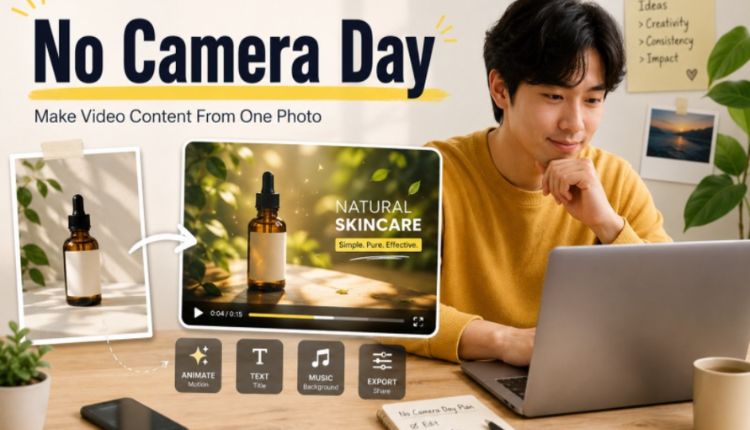
Every creator has a “no camera day.” I have had plenty of them.
Sometimes the weather is bad. Sometimes the product is not ready. Sometimes there is no time to film. Sometimes the room is messy, the lighting is wrong, or the idea feels too small to justify a full shoot. For small creators, this is not a rare problem. It is part of the work.
That is why I have become more interested in AI motion tools as practical backup tools, not just novelty apps. A free AI dance generator can turn a single image into playful movement, but the broader idea is bigger than dance. One photo can become a short video test, a social post, a product teaser, or a piece of filler content on a day when nothing new was filmed.
I do not see this as a replacement for real shooting. I see it as a way to keep content moving when production gets stuck.
Why Small Creators Run Out of Video Material
People often assume creators are always filming. In reality, most small creators work with limited resources.
They may not have:
- a dedicated studio
- extra lights
- a camera operator
- fresh product samples
- a daily filming schedule
- enough time to edit long videos
Even when the idea is good, filming can be inconvenient. A small business owner may only have product photos. A blogger may have old travel images. A musician may have cover art but no video footage. A coach may have brand portraits but no B-roll.
That is where image-based video workflows become useful. They give creators a way to produce motion content from assets they already have.
The Power of One Strong Photo
A single photo is often enough to start. It does not need to be perfect, but it should have a clear subject. A sharp portrait, a clean product image, a character illustration, or a well-framed lifestyle photo usually works better than a cluttered image.
When I test this kind of content, I ask three questions:
| Question | Why It Matters |
| Is the subject easy to understand? | Viewers need to know what they are looking at quickly |
| Would motion add value? | Not every photo needs to become a video |
| Can this become a short post? | The goal is practical content, not a full film |
This helps avoid forcing AI motion onto images that do not need it. The best results usually come from images that already have a clear mood or message.
What I Make on a No Camera Day
The most useful no-camera content is simple. I rarely try to create something too complicated from one image.
A product seller might animate a product photo with a subtle camera move. A personal brand creator might turn a portrait into a short intro clip. A music creator might add motion to cover art. A lifestyle blogger might reuse a travel photo as a short memory post.
For entertainment-focused content, dance clips can work well because they instantly add energy. For product or brand content, subtle movement is usually better. Too much motion can make the result feel less trustworthy.
The key is matching the movement to the purpose.
Turning Images Into Video Without Overproducing
I like AI image-to-video workflows because they sit between still design and full video production. They are not as demanding as filming, but they are more engaging than a static post.
A creator can use an AI image to video generator to test whether a product image, portrait, or concept visual can become a short motion asset. This is useful for social platforms where even a few seconds of movement can make a post feel more alive.
The workflow is usually simple:
- choose one clear image
- decide the purpose of the clip
- describe the motion in plain language
- generate a short preview
- keep the result only if it supports the message
That last step matters. Not every generated clip deserves to be posted. A no-camera day should not become a low-quality-content day.
Practical Examples for Small Creators
I have found this approach useful in several real content situations.
Product Teaser
A seller has one product photo but no new video. A light camera move, background motion, or product reveal effect can turn it into a teaser for social media.
Personal Brand Post
A freelancer or coach has a portrait but no fresh footage. A short animated intro can be used for a quote, announcement, or profile update.
Event Reminder
A poster or event graphic can become a moving reminder clip. This is often more noticeable than reposting the same flat image.
Entertainment Clip
A character image or personal photo can become a dance-style post when the goal is humor, trend participation, or casual engagement.
Portfolio Preview
Designers and artists can add motion to finished visuals to create short showcase posts without recording their screen.
The Risk of Making Everything Move
There is one mistake I see often: creators animate everything just because they can.
That usually makes the content worse. A calm product shot does not need wild motion. A professional service post may not benefit from cartoon-like movement. A personal photo should not be edited in a way that makes the subject uncomfortable or misleading.
My rule is this: motion should clarify the idea, not distract from it.
If the viewer remembers the effect but not the message, the clip did not work.
Why No-Camera Content Is Not Lazy
Some people may see AI-assisted content as a shortcut. I understand that concern, but I think it depends on how the tool is used.
For small creators, the hardest part is often consistency. They are trying to post regularly while also running a business, serving clients, managing orders, or handling daily life. A smart no-camera workflow helps them stay visible without pretending they had a full production day.
It also makes better use of existing assets. Most creators already have photos sitting unused in folders. Turning one of those images into a short clip can be more practical than waiting for the perfect filming setup.
A Better Way to Think About AI Motion
No-camera days will always happen. The question is whether creators have a backup plan.
AI motion tools give them one. They can take a useful image, add movement, test a short idea, and publish something that still feels relevant. The result may not replace a well-shot video, but it can keep the content calendar alive.
For small creators, that matters. Consistency is not always about producing more. Sometimes it is about finding smarter ways to use what you already have.